Day to day
Plan a route
Put a few places in the best order to drive them, without booking anything.
Put stops in the best order
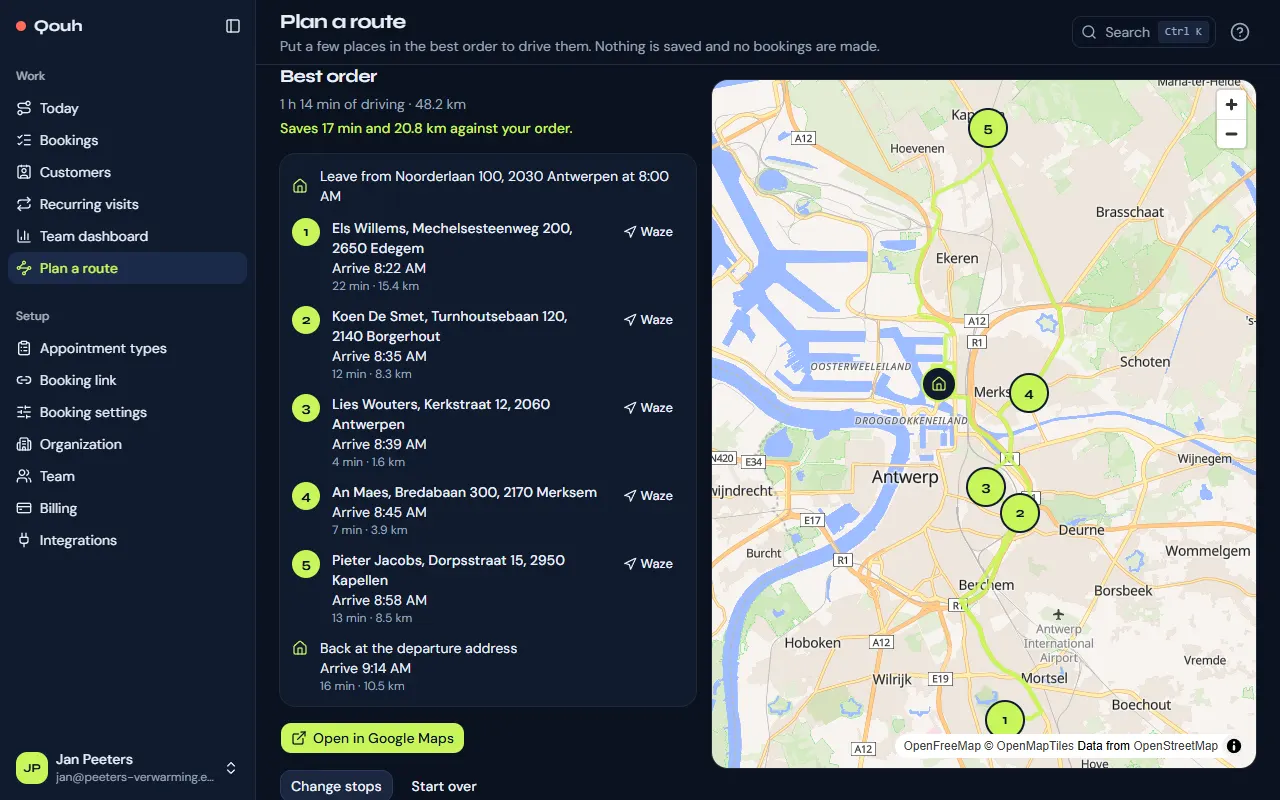
“Plan a route” (under Work) starts from your departure address. Add the places to visit, by address or by picking a customer, in any order, and choose where the route ends: back at the start, at another address or at the last stop. “Plan route” puts them in the order with the least driving. You can also paste a whole list, one address per line, here under “Paste a list” or in the “Plan a route” card on Today. After the lookup you check each line: the typed postcode and town are preferred, a match in another town is flagged, and you can pick another candidate or search again; in the stops list, the pin button changes a stop’s address.
Times on site and time windows
Set “Leave at” for when you set off. The clock next to a stop sets the minutes you stay there and, if needed, “Not before” and “Not after”. Stops that can’t fit their times are listed apart.
Drive it
You get each drive with its time and distance, the arrival times, the total and how much the best order saves against yours. “Open in Google Maps” opens the whole route; each stop also has Waze.
Good to know
Nothing is saved and no bookings are made: the route stays in this browser tab until you close it. On Free a route has up to 8 stops; on paid plans and during the trial, up to 25.
Still stuck? Ask us.